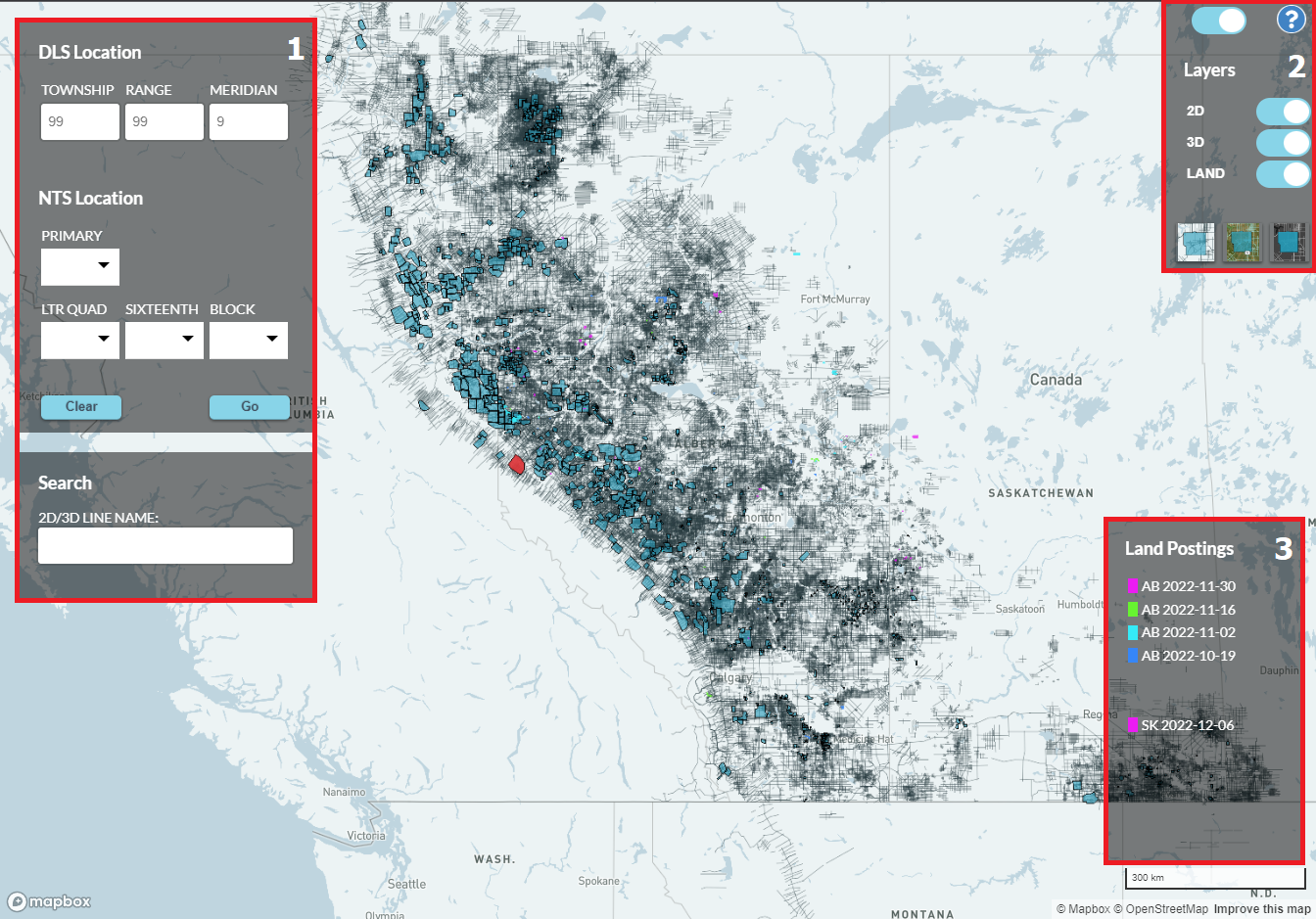
Our Seismic Data Library Map enables you to browse, search, and submit an order to QI seismic information from Pulse Seismic. The seismic data and land sale postings are updated regularly.
For more help or information, please contact our Sales Team:
-
Curtis Gillies:
403.531.0230 (office)
403.971.0665 (mobile)
Curtis.Gillies@pulseseismic.com
-
Brian Ingenthron:
403.531.0257 (office)
403.993.5528 (mobile)
Brian.Ingenthron@pulseseismic.com
-
Trevor Meier:
403.531.0259 (office)
403.990.7224 (mobile)
Trevor.Meier@pulseseismic.com
Pulse Seismic Inc.
2700, 421 - 7th Avenue SW Calgary, Alberta T2P 4K9
(403) 237-5559
www.pulseseismic.com
-
Search:
To search an area of interest (DLS/NTS), enter the location information and click the Go button. To search by a specific Line Name, enter the name and select from the drop-down list that will appear (requires at least 4 characters of the Line Name to be entered).
-
Toggle Control:
The toggle control, located in the top right corner of the map, allows you to remove the Search, Land Legend and Layer controls to give an unobstructed view of the map.
Layers:
The toggle buttons in the Layer section, allows you to turn the 2D, 3D and Land Layers, on and off.
Base Layers:
Click on the base layer images to change the maps base layer view (Basic, Satellite and Dark Mode)
-
Legend:
The Legend lists the color codes given to the available land sale postings.
-
Select:
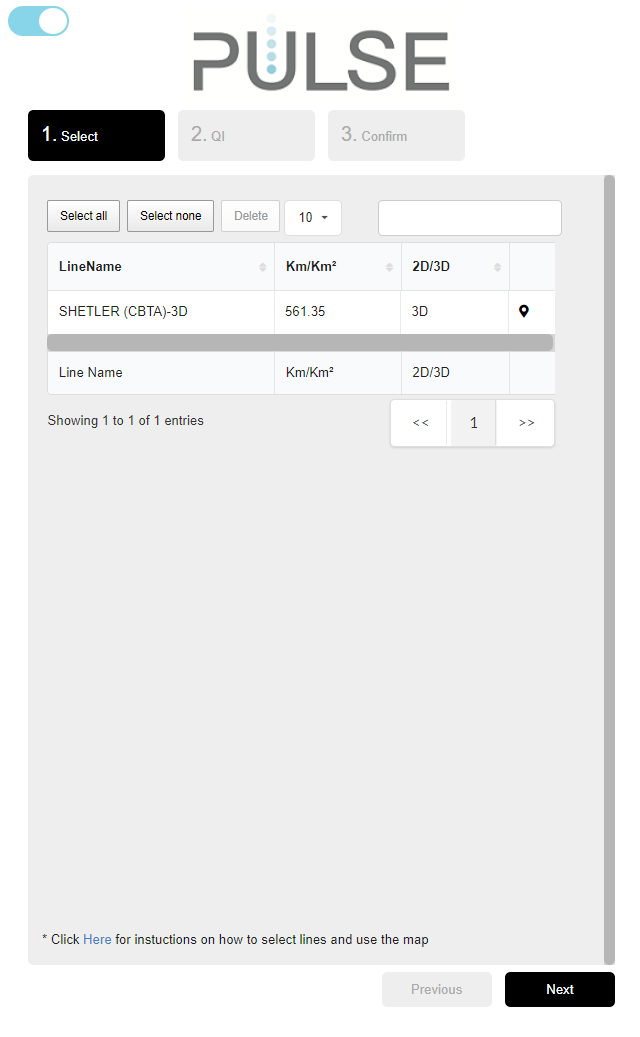
Selecting lines from the map is the first step in this process. The selected lines will appear in the line table and can be searched, sorted, and edited. See the FAQ tab for further information on how to add lines from the map. A minimum of one line must be selected to proceed to the next step by clicking on the Next button.
-
QI:
The second step requires some customer information to be entered for the order. There are 3 required fields: Email, Name and Telephone. You can also enter your company’s name and add a message for further instruction to our QI team. Once the required information has been entered you can proceed by clicking the Next button. If you want to go back and edit your line selection you can click the Previous button to go back to the line selection step.
-
Confirm:
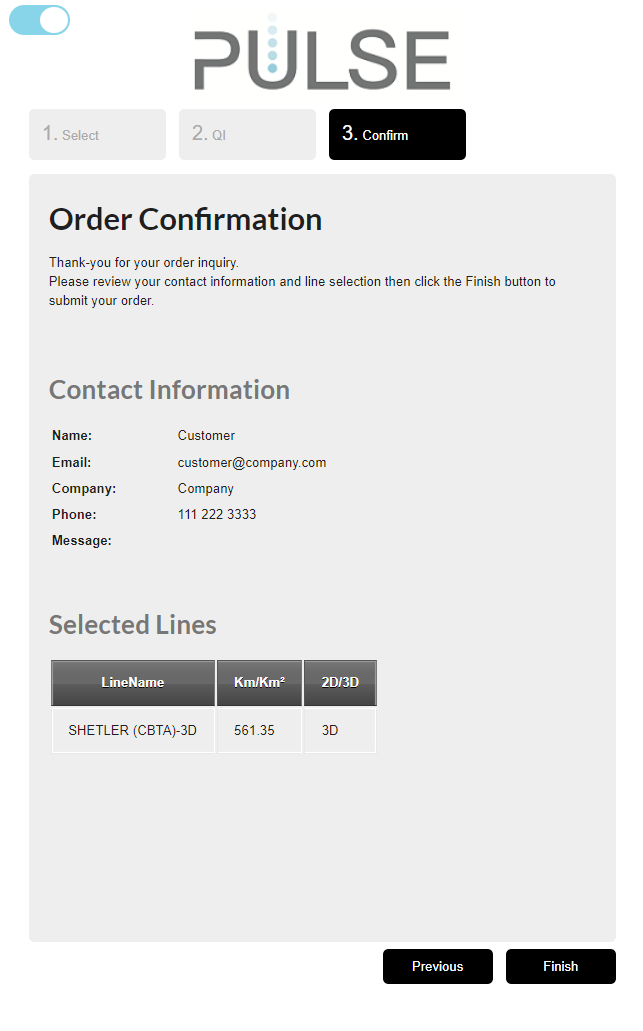
This is the last step to confirm that all the information is correct for the QI Request. To submit the request, click on the Finish button. If there are changes, you can navigate back to the previous steps by clicking on the Previous button. You will receive a confirmation email of your order and a member of our QI team will contact you as soon as possible.
-
Toggle Control:
The QI Line Selection Order Form toggle control, located in the top left corner of this section, allows you to toggle the form on and off. This allows a larger view of the map.

How to Navigate the Map:
-
Zoom:
Mouse: Navigate the mouse to the map and use the mouse scroll wheel up to zoom in and down to zoom out.
Keyboard: Click on the map then click the Shift and + keys to zoom in and the Shift and - keys to zoom out. -
Pan:
Mouse: Navigate the mouse to the map and click/hold the mouse left button and move the mouse in the direction you want to explore.
Keyboard: Click on the map and then use the arrow keys to move in the direction you want to explore. -
DLS & NTS Location Search:
Enter the Location information and click the Go button. -
2D/3D Line Name Search:
Enter a minimum of 4 characters into the Line Name search box and select the Line in the drop-down list and the map will fly-to and zoom to the line location. The search contains an automatic wild card which allows for a complete search for the line name no matter the position of the entered search text.
Example:
If “ABCD” is searched, the matching Line Name results could be:- ABCD
- 123ABCD
- ABCD123
- ...
-
Selected Line Table:
Click the map-marker icon from selected line table and the map will fly-to and zoom to the location of the selcted line.
How to Select Lines:
-
Single Line Click Select:
Use the mouse and click on the line you want to select. The selected line will be highlighted and will appear in the Selected Line Table. -
Multiple Line Select:
Hold down the Shift key and click and drag the mouse. This will create a selection box for the area of lines you want to select. When the selection box is the right size, release the mouse button and Shift key. The selected lines will be highlighted and will also appear in the Selected Line Table
How to Unselect Lines:
-
From the Selected Line Table:
Use the mouse to select a line and click the Delete button. Hold down the Ctrl key to select multiple lines in the table. To remove all the lines in the table, click the Select All button and then click the Delete button. -
From the Map:
Click on the highlighted line to unselect the selected line. Only single selects are available for this process.
How to Submit a QI Request:
There are 3 easy steps to submit a QI Request to Pulse:
- Select the lines of interest from the map and click the Next button.
- Enter the required customer information and click the Next button.
- Confirm the information is correct and click the Finish button.
See the QI FORM tab for further details.
How to Show Grid Lines:
Grid lines will start to display once the area is zoomed in to a certain level.
What Devices Can I Use:
The focus of our testing has been on Desktop computers with a modern Browser (Chrome, Firefox, and Edge). We have restricted phone devices because of the size limitations of the displays.
